

Featured Image Featured Image

Setup & Configure Fully Functional Legal Entity in D365 from scratch – General Journal Setup

Learn how to set up General Journals for a newly created legal entity in Microsoft Dynamics 365 Finance. This step-by-step guide covers navigation, journal name creation, voucher series setup, and ledger account configuration to ensure accurate financial postings.

We need to setup General Journals for newly setup legal entity

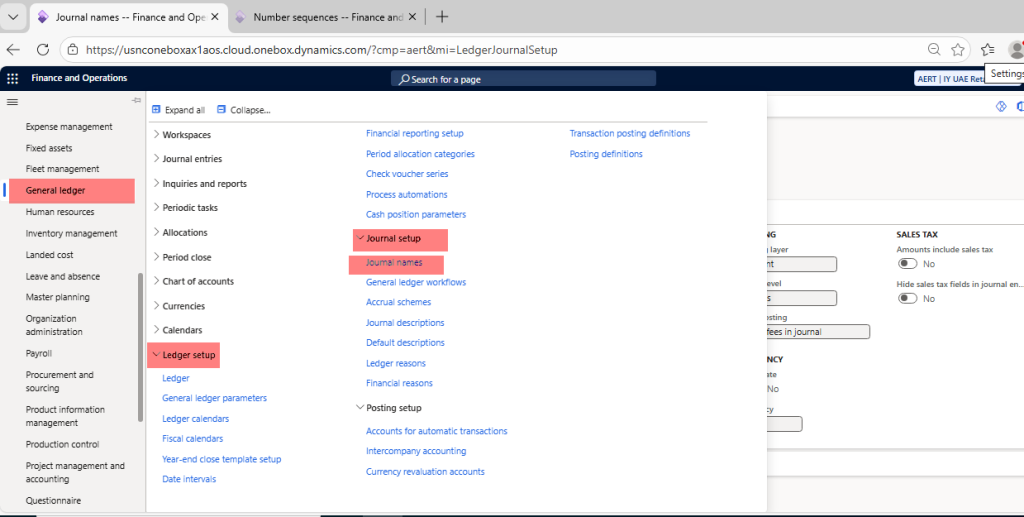
Navigate to General Ledger > Ledger Setup > Journal Setup > Journal Names >
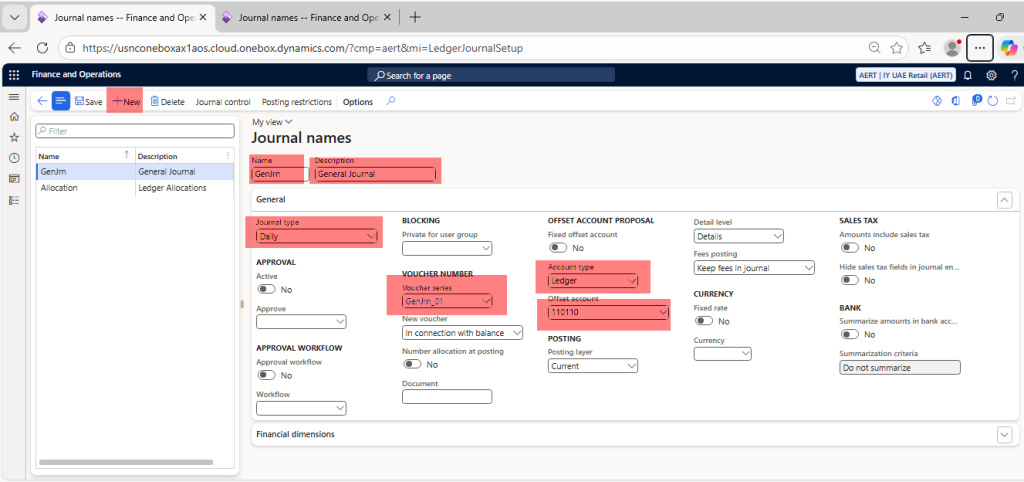
Click on new > Name (GenJrn) > Description (General Journal) > Journal type (Daily) > Voucher series (GenJrn_01), If Voucher series is not available, we need to create > Account type (Ledger) > Offset account (110110) > Save
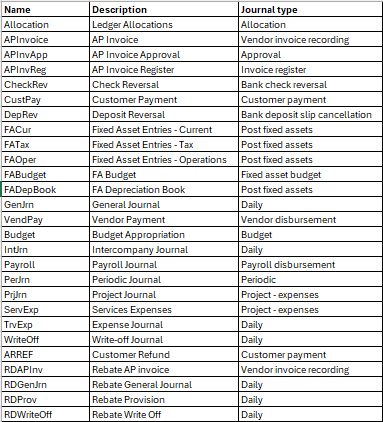
Repeat above process for remaining below General Journals

Leave a Reply

Your email address will not be published. Required fields are marked *