
Introduction
In Microsoft Dynamics 365 Finance and Operations (D365 F&O), products are a core part of system configuration and business processes. Understanding how products are defined and categorized is essential for effective inventory, procurement, and sales management.
Global vs Company-Level Product Definition
Products in Dynamics 365 Finance and Operations can be defined at either the Global level or the Company (Legal Entity) level.
- Global Products
These products are created once and shared across multiple legal entities. This approach ensures consistency, reduces duplication, and simplifies product management in organizations operating in multiple companies. - Company-Level Products
These products are specific to a single legal entity. They are useful when product usage, pricing, or setup differs from one company to another and does not need to be shared globally.
Product Types in Dynamics 365 F&O
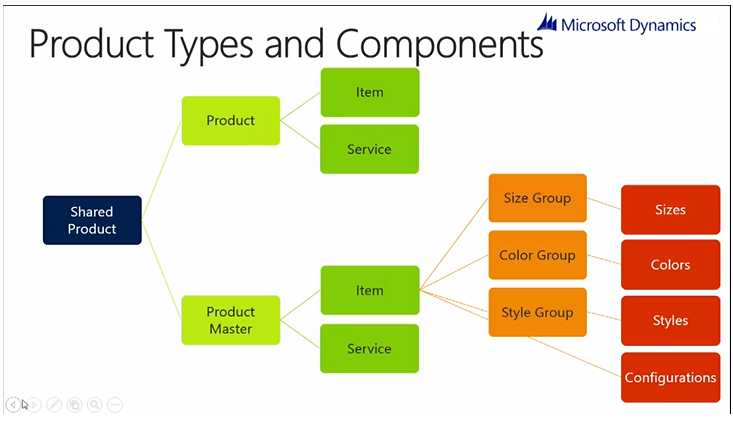
When creating a product, you must define its Product Type and Sub Product Type. Dynamics 365 Finance and Operations supports two main product types:
1. Item (Stock Product)
- Used for physical products
- Inventory is tracked and managed
- Commonly used in procurement, warehousing, production, and sales processes
- Supports inventory dimensions such as site, warehouse, batch, and serial numbers
Example: Raw materials, finished goods, spare parts
2. Service (Non-Stock Product)
- Used for non-physical products
- Inventory is not tracked
- Commonly used for services, fees, or charges
- Does not require warehouse or inventory setup
Example: Consulting services, maintenance charges, transportation fees
Product Subtypes: Product vs. Product Master
Each product type (Item & Service ) can further be classified into one of the following subtypes:
Subtype: Product (Simple Product)
- Used for simple products without variations
- Example: A single USB cable with no size, color, or style differences
Subtype: Product Master (Variable Product)
- Used for products that have multiple variations
- Variations are based on product dimensions such as:
- Size
- Color
- Style
- Configuration
Product Master Example
A common example of a Product Master is a Shirt.
A shirt may be available in:
- Different sizes (S, M, L)
- Different colors (Red, Blue, Green)
Instead of creating a separate item for each combination manually, Dynamics 365 F&O allows you to manage all variations efficiently using Product Dimension Groups.
Product Dimensions and Variants
Product Dimensions
Product dimensions define the attributes that create variations of a product. For example:
- Color: Red, Green, Blue
- Size: S, M, L
These dimensions are grouped using Product Dimension Groups.
Product Variants
Once the dimension values are defined, you can create product variants by combining the dimensions. Examples include:
- Red – Small Shirt
- Red – Medium Shirt
- Red – Large Shirt
- Blue – Small Shirt
- Blue – Medium Shirt
Each variant represents a unique sellable and inventory-managed product.
Conclusion
Choosing the correct product level (Global or Company) and product type (Item or Service) and Product SubType (Product or Product Master) in Dynamics 365 Finance and Operations is crucial for accurate inventory control, financial postings, and operational efficiency. Proper product setup ensures smoother transactions across procurement, sales, and accounting processes.