

In Dynamics 365 Finance and Operations (D365 F&O), sharing vendors between legal entities is a straightforward process. This is possible because vendor records are stored as parties in the Global Address Book (GAB), which is shared across all legal entities within the system. As a result, once a vendor exists as a party, it can be easily reused in another legal entity without re-entering master data.
Steps to Share a Vendor with Another Legal Entity
You can easily share an existing vendor using the Vendor card by following the steps below:
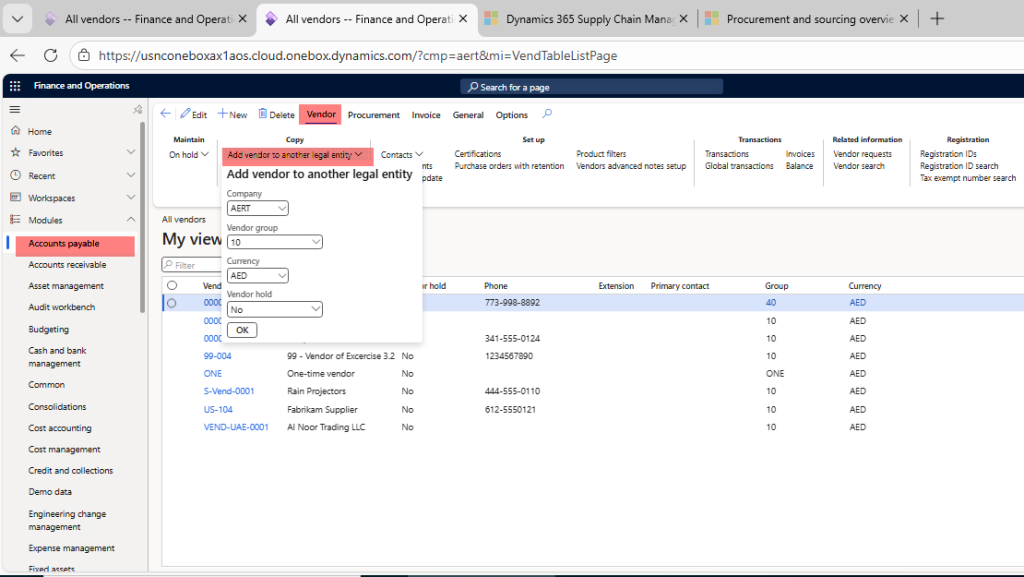
- Navigate to Accounts payable or Procurement and sourcing
- Go to All vendors
- Open the vendor you want to share
- Click on the Vendor menu
- Select Add vendor to another legal entity
- Enter the required information:
- Target legal entity: AERT
- Vendor group: 40
- Currency: AED
- Vendor hold: No
- Click OK to complete the process
Once completed, the vendor will be available in the selected legal entity.
Vendor Number Sequence Considerations
- The Vendor account number sequence should not be set to Manual
- By default, the system generates a new vendor account number in the target legal entity
Using the Same Vendor Number Across Legal Entities
If your organization requires the same vendor ID across multiple legal entities, you must configure a shared vendor number sequence.
This can be achieved by:
- Configuring a shared vendor number sequence from the Accounts payable module parameters
- Overriding the number sequence at the Vendor Group level by setting the Vendor account number sequence field
Using shared number sequences helps maintain consistency and simplifies vendor reporting across legal entities.